What is Skim?
The one-sentence version
Skim is a free, open-source browser extension that turns any markdown file into a clean, readable page, right in your browser. Open a local .md file, a markdown URL, or a README on the web, and instead of raw # symbols and asterisks you get formatted headings, tables, task lists, math, diagrams, and a table-of-contents sidebar. Nothing is uploaded, and there is no account to create. It works in Chrome, Edge, and Firefox.
People also search for it as "skim md" or skim.md, which is the project's home. Whatever you call it, it is the same thing: a markdown reader for the browser, built by people who read a lot of markdown.
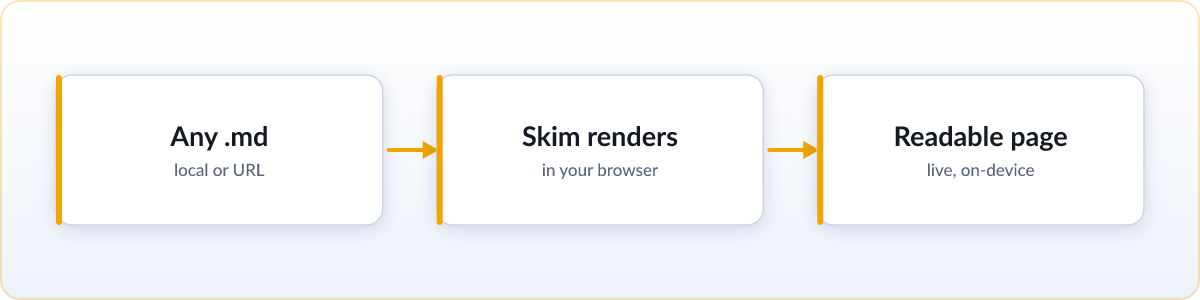
.md file and Skim renders it in place, on your device.Built for the AI era
The reason Skim exists is that AI coding agents now write markdown constantly. Plans, specs, task lists, research notes, and status docs pour out of tools like Claude Code and ChatGPT, and they get rewritten while you are still reading them. Skim is designed for exactly that workflow:
- Live reload. Skim watches the file and re-renders it in place the moment it changes on disk. Leave a plan open in a tab and watch your agent tick off tasks and revise sections in real time, no manual refresh.
- Copy for AI. One click turns the rendered document back into clean markdown source, ready to paste into your next prompt.
- Render clipboard as MD. Copy markdown out of a chat with Claude or ChatGPT and open it as a rendered page in one click, with nothing saved to disk.
- Frontmatter as a header card. YAML frontmatter renders as a readable summary at the top instead of a wall of raw keys.
Crucially, Skim does none of this by calling a language model. There are no AI features that phone home, no telemetry, and no network calls on your behalf. It is a reader built for AI-written files, not an AI product.
What it renders
Skim aims to render the markdown people actually write, not a minimal subset. That includes GitHub-flavored markdown, tables, task lists, and syntax-highlighted code blocks; LaTeX math through KaTeX and mermaid diagrams; footnotes, GitHub-style alerts, emoji shortcodes, and images with a click-to-zoom lightbox. On top of the content it adds reading conveniences: a table-of-contents sidebar with scrollspy, light and dark themes with six color schemes, a zen mode that hides the sidebar, folder browsing for whole projects, print-quality PDF export, standalone HTML export, keyboard and vim navigation, and interface translations in more than fifty languages. All of it works offline, and the release notes track what each version adds.
How Skim compares
Markdown viewers for the browser are not new. What sets Skim apart is a combination of being genuinely open, genuinely free, and current.
| Skim | Typical alternatives | |
|---|---|---|
| License | MIT open source | Often closed source |
| Price | Free, every feature | Some put folder browsing or diagrams behind a paid tier |
| Folder browsing | Included, free | Sometimes a Pro feature |
| Live reload for AI-written files | Yes | Rare |
| Telemetry | None | Varies |
| Maintenance | Actively developed | Some popular ones are unmaintained since 2024 |
The short version: features that other viewers reserve for a Pro upgrade are free in Skim, the whole thing is open source so you can read exactly what it does, and it is being actively worked on. For a detailed, tool-by-tool breakdown, see our guide to the best markdown viewer extensions.
Free and private
Skim is MIT-licensed and free, with no Pro tier, no paywall, and no sign-up. Because it renders everything locally in your browser, your files never leave your machine: there is no server, no telemetry, and no analytics running on your behalf. The extension is light, and the source is public on GitHub if you want to audit it or contribute.
How to start
Add Skim to your browser and open any .md file, local files included once you allow file access. If you would rather not install anything, our free online viewer renders any markdown you drag onto it, with nothing uploaded.
Add to ChromeFree · open source · no sign-upUsing another browser? See every install option →
FAQ
What is Skim, in plain terms?
Skim is a free, open-source browser extension that renders markdown files as clean, formatted pages inside your browser. It handles local files, markdown URLs, and READMEs, with live reload, math, diagrams, and a table-of-contents sidebar.
Is Skim free?
Yes. Skim is MIT open source and completely free, including features like folder browsing that some other viewers charge for. There is no Pro tier and no account.
How is Skim different from other markdown viewers?
Three things: it is open source rather than closed, every feature is free rather than split across a paid tier, and it is built for AI workflows with live reload of agent-written files and a Copy for AI button. It is also actively maintained, where some popular alternatives have not been updated since 2024.
Does Skim send my files anywhere?
No. Everything renders locally in your browser. There is no upload, no telemetry, and no network call on your behalf, and Skim works fully offline.
Which browsers does Skim support?
Chrome, Edge, and Firefox. It installs from each browser's extension store.
Is "skim md" the same as Skim?
Yes. "Skim md" and skim.md both refer to Skim, the markdown viewer. The .md comes from the markdown file extension, which is also the project's domain.
Can Skim open local .md files on my computer?
Yes. After you enable "Allow access to file URLs" for the extension, which Skim walks you through with a single switch, it renders local file:// markdown exactly like a file on the web. Nothing is uploaded.
What markdown features does Skim support?
GitHub-flavored markdown, tables, task lists, and syntax-highlighted code, plus LaTeX math through KaTeX, mermaid diagrams, footnotes, GitHub-style alerts, emoji shortcodes, and images with a click-to-zoom lightbox. On top it adds a table-of-contents sidebar, light and dark themes, and folder browsing.
Does Skim work offline?
Yes. Skim renders everything locally in your browser, so it works with no internet connection. Math and diagrams render offline too, with no external requests.
Is Skim safe and private?
Yes. Skim is open source under the MIT license, so anyone can audit exactly what it does. It has no telemetry, no analytics, and makes no network calls on your behalf, and your files never leave your device.