What is markdown?
The short version
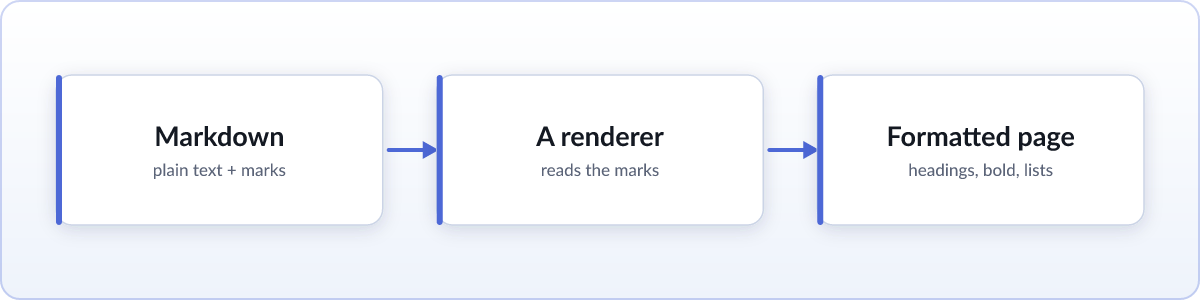
Markdown is a way of writing formatted text using plain characters you already have on your keyboard. You put a # in front of a line to make it a heading, wrap a word in ** to make it bold, and start a line with - to make a list item. The result stays perfectly readable as raw text, and a renderer can turn those same marks into a proper formatted page with real headings, bold text, and bulleted lists.
It was created in 2004 by John Gruber, with help from Aaron Swartz, and the goal was stated plainly at the time: a markdown document should be publishable as plain text, without looking like it has been marked up with tags or instructions. That single idea explains almost everything about how markdown looks and why people like it.
Why markdown exists
Before markdown, writing for the web usually meant HTML, where a bit of bold text looks like <strong>bold</strong> and a link is a mouthful of angle brackets and quotes. That is precise, but it is tiring to write and unpleasant to read in its raw form. Markdown was designed to fix both problems at once:
- The source is easy to read on its own. You can hand someone a raw markdown file and they will understand it, marks and all.
- It converts cleanly to HTML. A renderer reads the marks and produces the formatted page a browser can display.
So markdown is readable two ways at the same time: as source text and as a rendered document. That is the property that made it spread.
Where you run into it
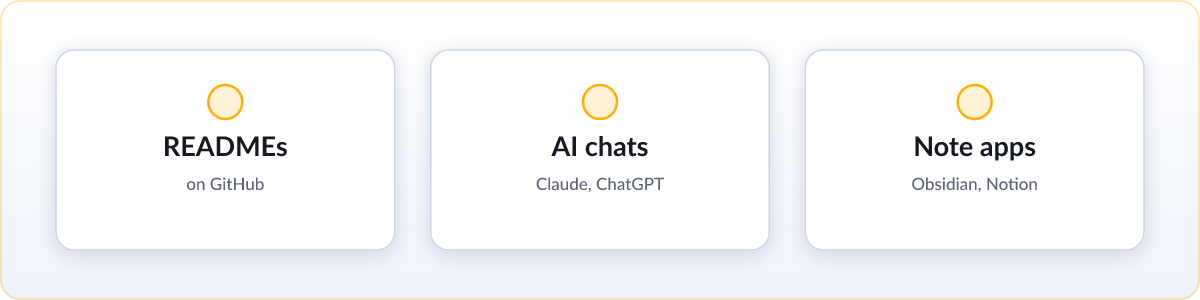
Once you know the name, you start seeing markdown everywhere:
- Code projects. Almost every software project ships a
README.md, the front-page description of what the project is and how to use it. On GitHub and similar sites, that file is rendered automatically at the top of the page. - Community sites. Reddit comments, Discord messages, and Stack Overflow posts all accept markdown, which is why typing
**this**makes text bold in those boxes. - Note apps. Obsidian stores its notes as plain markdown files, and Notion and many others can export to it, so your writing is not locked inside one company's format.
- AI tools. Claude, ChatGPT, and similar assistants increasingly write their answers, plans, and reports as markdown, and often hand you a
.mdfile directly. When an answer comes back with neat headings and bullet points, that is markdown being rendered for you.
The core syntax, with examples
Markdown's whole vocabulary fits on a page. Each example below shows the raw text you type on the left and the formatted result it renders to on the right.
Headings
One to six # characters at the start of a line set the heading level, from largest to smallest:
# Title
## Section
### SubsectionBold and italic
Wrap text in asterisks. One asterisk on each side is italic, two is bold:
*italic* and **bold**italic and bold
Lists
Start lines with - for a bulleted list, or with numbers for an ordered one:
- first point
- second point

1. step one
2. step two- first point
- second point
- step one
- step two
Links and images
A link is the visible text in square brackets followed by the address in parentheses. An image is the same with an exclamation mark in front, where the bracketed text becomes the alt description:
[Skim](https://skim.md/)
and the image embeds inline, using a diagram as its alt text.
Code
Wrap a short snippet in single backticks to show it inline. For a whole block, put it between lines of three backticks:
Here is `inline code` in a sentence.

```
a whole
block of code
```
Here is inline code in a sentence.
a whole
block of code
Blockquotes
Start a line with > to quote it:
> This line is quoted.This line is quoted.
Tables
Rows are separated by pipes, with a line of dashes marking the header:
| Name | Role   |
| :- | :- |
| Ada | Author || Name | Role |
|---|---|
| Ada | Author |
That is close to the entire language. The reason people can pick it up in an afternoon is that there is genuinely not much more to learn.
The source versus the rendered page
This is the point that trips people up most, so it is worth stating clearly. A .md file holds the source: the plain text with the marks still visible. The rendered page is what you get after a program reads those marks and applies real formatting. They are two views of the same content.
When you double-click a .md file and get a wall of text with stray # and ** symbols, nothing is broken. You are simply looking at the source, because whatever opened it does not render markdown. Give the same file to something that does, like GitHub, a note app, or a viewer, and you get the clean formatted version instead. Both are correct; one just has the formatting turned on.
Flavors of markdown
Gruber's original markdown covered the basics but left some gaps, and it did not define every edge case precisely. Over the years, a few standardized versions filled those gaps:
- CommonMark is a strict, carefully specified version of the original, written so that different tools render the same document the same way. It is the common base most modern renderers build on.
- GitHub Flavored Markdown, often shortened to GFM, extends CommonMark with the practical extras GitHub needed: tables, task list checkboxes, strikethrough with
~~text~~, and automatic links from bare URLs.
In everyday use the differences rarely matter. The headings, bold, lists, and links you learned above work the same across all of them. The flavors mostly add features on top rather than changing the core.
How to actually read a .md file
Since a raw .md file shows you the source, reading it comfortably just means pointing it at something that renders markdown. You have a few easy options:
- Online, nothing installed. Drag the file onto the free online markdown viewer and read it formatted in a couple of seconds. The file is rendered on your own device, so nothing is uploaded.
- In your browser, every time. A browser extension can render every
.mdfile you open automatically, local files included. That is the "set it up once and forget it" option covered in our guide on how to open a .md file. - With apps you already have. Any text editor opens the source, and VS Code has a built-in preview pane that shows the formatted version alongside it.
FAQ
What does markdown actually do?
It lets you write formatted text using plain keyboard characters. Marks like # for a heading and ** for bold stay readable as raw text, and a renderer turns them into a real formatted page with headings, bold text, and lists.
What is the difference between markdown and a .md file?
Markdown is the writing format, the set of rules for those formatting marks. A .md file is just a text file saved in that format. The .md extension tells other programs the text inside uses markdown.
Is markdown the same as HTML?
No, but they are related. Markdown is a simpler, more readable way to write, and a renderer converts it into HTML for a browser to display. You can even drop raw HTML into a markdown file when you need something markdown does not cover.
Do I need to learn markdown to read a .md file?
No. Open the file with anything that renders markdown, like GitHub, a note app, or an online viewer, and you get a normal formatted page. Knowing the marks only helps if you want to write markdown yourself.