A markdown viewer for Safari that works today
Why raw markdown looks like a wall of text in Safari
A markdown file, the kind ending in .md, is plain text with a few formatting marks mixed in: # for a heading, **bold** for bold, - for a list item, and pipes and dashes for tables. Safari does not understand those marks on its own. Open a .md file in Safari and it either downloads the file or shows the raw text, symbols and all, as one long unformatted block. Nothing is broken. Safari simply has no built-in markdown viewer, so it hands you the source instead of the page the source describes.
You want the opposite: real headings, readable tables, highlighted code, and working links. On Safari today the fastest way to get there needs nothing installed at all.
Fastest today: the free online viewer
Skim does not yet have a Safari extension in the App Store, so we are not going to send you hunting for one. The honest, working answer right now is the free online markdown viewer. It opens in Safari on a Mac and in Safari on iPhone or iPad, and it renders your file on the page with nothing to install.
- Open the free online markdown viewer in Safari.
- Drag your
.mdfile onto the page, or tap to choose it from Files or Downloads. - Read it, fully formatted, in a couple of seconds.
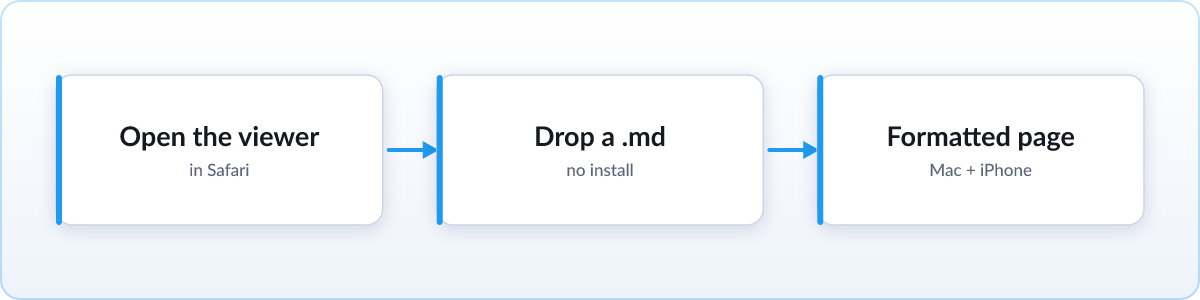
Nothing is uploaded. The file is rendered entirely on your device, so it works the same on a Mac, an iPhone, or an iPad, and even on a computer you do not own. There is nothing to configure and no account to create. For a file you will open once, this is genuinely the easiest route on Safari, and you can stop reading here.
A native Safari extension is on the way
A dedicated Skim extension for Safari is in the works. When it ships it will live on the Mac App Store and install like any other Safari extension, so that opening a .md file renders it as a formatted page automatically, every time, with no extra steps. It is built to carry the same features Skim already offers on other browsers:
- Live reload. The file re-renders in place the moment it changes on disk, so an AI agent's plan ticks off its tasks in real time with your scroll position kept.
- KaTeX math. LaTeX expressions render as real equations instead of raw backslashes and braces.
- Mermaid diagrams. Flowcharts and sequence diagrams written as code render as actual diagrams.
- GFM tables. GitHub-flavored tables, task lists, footnotes, and syntax-highlighted code blocks all render correctly.
- Folder view. Browse a whole project of markdown files from a sidebar, free, with no Pro tier gating it.
Until that build lands, the online viewer above covers the everyday case, and you can watch the install page for the moment the Safari version goes live.
Other options already on your Mac
If you are on a Mac and would rather use what you already have, two tools open a .md file without anything new, though they show you the source rather than a fully styled page.
Select the file in Finder and press Space for Quick Look, which shows the text without opening a full app. Or open the file in VS Code, which has a built-in preview pane so you can see the source and the formatted version side by side. For a deeper walkthrough of every route on a Mac, read our guide to opening .md files on a Mac.
FAQ
Is there a Skim extension for Safari yet?
Not yet. A native Safari extension is on the way and will ship on the Mac App Store. Until then, the free online viewer at skim.md/viewer works in Safari on Mac and iOS with nothing to install.
Does Safari have a built-in markdown viewer?
No. Safari shows a .md file as raw text or downloads it, because it has no built-in way to render markdown. You need a viewer like the free Skim online viewer to see it as a formatted page.
Can I read markdown on an iPhone or iPad?
Yes. Open the online viewer in Safari on iOS or iPadOS, then choose your .md file from Files or Downloads. It renders on the device and nothing is uploaded.
Is the online viewer free and private?
Yes. It is free, needs no account, and renders every file on your own device. Nothing is uploaded and no data is collected.
Is there an md viewer or md reader for Safari?
Yes. "md viewer", "md reader" and "markdown reader" all describe the same thing, since .md is the file extension for markdown. Skim is a free, open source md viewer for Safari that renders every .md file you open, local files included.