A markdown reader for Chrome that just works
Why raw markdown looks like a wall of text
A markdown file, the kind ending in .md, is plain text with a few formatting marks mixed in: # for a heading, **bold** for bold, - for a list item, and pipes and dashes for tables. Chrome does not understand those marks on its own. Open a .md file in a fresh tab and Chrome either downloads it or shows the raw text, symbols and all, as one long unformatted block. Nothing is broken. Chrome simply has no built-in markdown reader, so it shows you the source instead of the page the source describes.
A markdown reader for Chrome fixes that. It sits in the browser, notices when a page is markdown, and turns those marks into a formatted document: real headings, readable tables, highlighted code, working links. You open the file the way you always would, and it arrives as a clean page instead of a symbol soup.
Skim: a free, open-source markdown reader for Chrome
Skim is a free, open-source Chrome extension that renders markdown automatically. Once it is installed, any .md file you open, whether it is a URL on the web, a README, or a local file on your own disk, opens as a formatted page. There is no button to press and no menu to find. Skim recognizes markdown and renders it for you.
It is MIT-licensed, so the source is public and anyone can read exactly what it does. It collects no data, runs no telemetry, and makes no network calls on your behalf. Everything renders on your device. And although it is built for Chrome, the same extension installs on Edge, Brave, Opera, and other Chromium browsers, since they all share the Chrome Web Store.
How to add it to Chrome
Setup takes about two minutes, and most of that is one privacy switch Chrome asks you to flip.
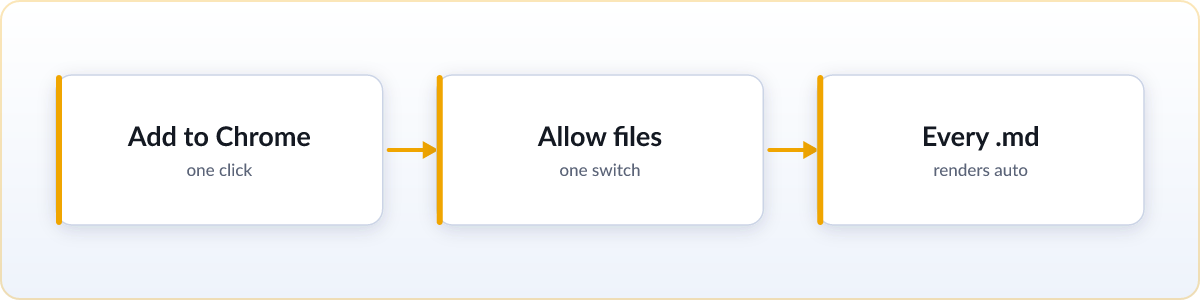
- Add Skim from the Chrome Web Store. It installs like any other extension, with one click.
- Flip Chrome's file-access switch. Chrome hides local files from extensions by default, so to read
.mdfiles from your own disk it needs your permission once. Skim shows you exactly where to click, so you are not hunting through settings. - Open any
.mdfile from now on. It renders as a formatted page automatically, every time, with no extra steps.
If you only ever open markdown files on the web and never local ones, you can skip step two entirely. The file-access switch only matters for files stored on your own computer.
What Skim can do
A reader is only as good as what it renders. Skim aims to handle the markdown people actually write, not a stripped-down subset:
- Live reload. Skim watches the file and re-renders it in place the moment it changes on disk. Leave an AI agent's plan open in a tab and watch it tick off tasks in real time, no manual refresh, with your scroll position kept.
- KaTeX math. LaTeX expressions render as real equations instead of raw backslashes and braces.
- Mermaid diagrams. Flowcharts and sequence diagrams written as code render as actual diagrams.
- GFM tables. GitHub-flavored markdown tables, task lists, footnotes, and syntax-highlighted code blocks all render correctly.
- Folder view. Browse a whole project of markdown files from a sidebar, free, with no Pro tier gating it.
- Copy as markdown. One click turns the rendered page back into clean markdown source, ready to paste into your next prompt or document.
- Private and on-device. Files never leave your machine. No account, no telemetry, no data collected, and it all works offline.
- Themes and zen mode. Light and dark, six color schemes, and a zen mode that hides the sidebar for a long read. See what's new.
- Export to PDF or HTML. Print-quality PDF with page margins and an optional contents page, or a single self-contained
.htmlfile that opens anywhere. - Keyboard navigation. Tab through the document block by block, or use vim keys: j and k to scroll, gg and G to jump.
- Render the clipboard. Copy markdown from a chat or a terminal and open it as a rendered page in one click, with nothing saved to disk.
No install? Read it online instead
If you only need to read one file and would rather not add anything to Chrome, there is a no-install option. The free online markdown viewer renders any .md file you drag onto the page, right in the browser, with nothing uploaded. It works on a work laptop, a phone, or a computer you do not own. For a file you will open once, that is genuinely the fastest route. For files that keep landing in your downloads folder, the extension is the better long-term fix, because after setup every file just works.
Other readers exist
Skim is not the only markdown reader for Chrome, and we will not pretend otherwise. Older, well-established options have larger user bases and more rendering plugins, and one competitor has a more polished interface. If you want a fair, tool-by-tool breakdown of the choices, including where the others beat Skim, read our honest comparison of the best markdown viewer extensions. Pick whichever fits how you read.
FAQ
Does Chrome have a built-in markdown reader?
No. Chrome shows a .md file as raw text or downloads it, because it has no built-in way to render markdown. You need an extension like Skim, or an online viewer, to see it as a formatted page.
Is the Skim markdown reader free?
Yes. Skim is MIT open source and completely free, with no Pro tier, no paywall, and no account. Features that some other readers charge for, like folder browsing, are free in Skim.
Can it read local .md files from my computer?
Yes. After you flip Chrome's "Allow access to file URLs" switch, which Skim walks you through once, it renders local .md files exactly like ones on the web. Nothing is uploaded.
Does it work on Edge, Brave, and Opera?
Yes. Edge, Brave, Opera, and other Chromium browsers all install from the Chrome Web Store, so the same extension works on them too.
Does Skim collect any data?
No. Skim renders everything on your device. There is no telemetry, no analytics, and no network call on your behalf, and it works fully offline.
Is there an md viewer or md reader for Chrome?
Yes. "md viewer", "md reader" and "markdown reader" all describe the same thing, since .md is the file extension for markdown. Skim is a free, open source md viewer for Chrome that renders every .md file you open, local files included.