A markdown viewer for Arc that just works
Why raw markdown looks like a wall of text
A markdown file, the kind ending in .md, is plain text with a few formatting marks mixed in: # for a heading, **bold** for bold, - for a list item, and pipes and dashes for tables. Arc does not understand those marks on its own. Open a .md file in a new tab and Arc either downloads it or shows the raw text, symbols and all, as one long unformatted block. Nothing is broken. Arc simply has no built-in markdown viewer, so it shows you the source instead of the page the source describes.
A markdown viewer for Arc fixes that. It sits in the browser, notices when a page is markdown, and turns those marks into a formatted document: real headings, readable tables, highlighted code, working links. You open the file the way you always would, and it arrives as a clean page instead of a symbol soup.
Skim: a free, open-source markdown viewer for Arc
Skim is a free, open-source extension that renders markdown automatically in Arc. Once it is installed, any .md file you open, whether it is a URL on the web, a README, or a local file on your own disk, opens as a formatted page. There is no button to press and no menu to find. Skim recognizes markdown and renders it for you.
Arc is built on Chromium, the same engine behind Chrome, so it installs extensions from the Chrome Web Store directly. There is no separate Arc extension store and no Arc-specific build to hunt for. The Chrome listing is the Arc listing.
Skim is MIT-licensed, so the source is public and anyone can read exactly what it does. It collects no data, runs no telemetry, and makes no network calls on your behalf. Everything renders on your device.
How to add it to Arc
Setup takes about two minutes, and most of that is one switch for local files.
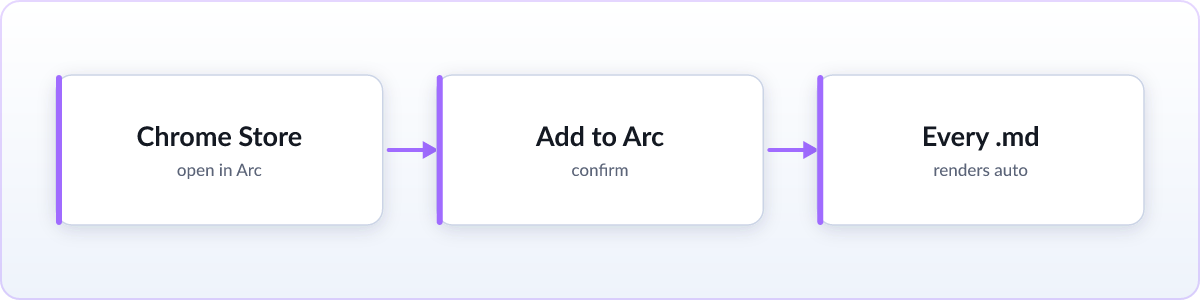
- Open the Skim listing on the Chrome Web Store in Arc and click "Add to Arc" (the button reads "Add to Chrome" on some Arc versions; it installs into Arc either way).
- Confirm the permission prompt. Arc installs the extension and pins it to your toolbar.
- Open any
.mdfile from now on. It renders as a formatted page automatically, every time, with no extra steps.
Reading local files
To render .md files stored on your own disk (anything opened as a file:// address), Arc needs to let the extension run on local files, exactly as Chrome does. Open arc://extensions or chrome://extensions, find Skim, click Details, and turn on "Allow access to file URLs". Skim also walks you through this the first time you open a local markdown file, so you do not have to hunt for it. After that, any .md file on your computer opens as a formatted page. Nothing is uploaded.
What Skim can do
A viewer is only as good as what it renders. Skim aims to handle the markdown people actually write, not a stripped-down subset:
- Live reload. Skim watches the file and re-renders it in place the moment it changes on disk. Leave an AI agent's plan open in a tab and watch it tick off tasks in real time, no manual refresh, with your scroll position kept.
- KaTeX math. LaTeX expressions render as real equations instead of raw backslashes and braces.
- Mermaid diagrams. Flowcharts and sequence diagrams written as code render as actual diagrams.
- GFM tables. GitHub-flavored markdown tables, task lists, footnotes, and syntax-highlighted code blocks all render correctly.
- Themes and zen mode. Light and dark, six color schemes, and a zen mode that hides the sidebar for a long read. See what's new.
- Export to PDF or HTML. Print-quality PDF with page margins and an optional contents page, or a single self-contained
.htmlfile that opens anywhere. - Keyboard navigation. Tab through the document block by block, or use vim keys: j and k to scroll, gg and G to jump.
- Render the clipboard. Copy markdown from a chat or a terminal and open it as a rendered page in one click, with nothing saved to disk.
- Folder view. Browse a whole project of markdown files, free, with no Pro tier gating it.
- Private and on-device. Files never leave your machine. No account, no telemetry, no data collected, and it all works offline.
No install? Read it online instead
If you only need to read one file and would rather not add anything to Arc, there is a no-install option. The free online markdown viewer renders any .md file you drag onto the page, right in the browser, with nothing uploaded. For a file you will open once, that is genuinely the fastest route. For files that keep landing in your downloads folder, the extension is the better long-term fix, because after setup every file just works.
FAQ
Does Arc have a built-in markdown viewer?
No. Arc shows a .md file as raw text or downloads it, because it has no built-in way to render markdown. You need an extension like Skim, or an online viewer, to see it as a formatted page.
Is there an md viewer or md reader for Arc?
Yes. "md viewer", "md reader" and "markdown reader" all describe the same thing, since .md is the file extension for markdown. Skim is a free, open source md viewer for Arc that renders every .md file you open, local files included.
Can I install Chrome extensions in Arc?
Yes. Arc is built on Chromium and installs extensions from the Chrome Web Store directly. Open the Skim listing in Arc and click Add. There is no separate Arc store.
Can it read local .md files from my computer?
Yes. Open arc://extensions, click Details on Skim, and enable "Allow access to file URLs". Skim walks you through this the first time you open a local file. After that it renders local .md files exactly like ones on the web, and nothing is uploaded.
Does Skim collect any data?
No. Skim renders everything on your device. There is no telemetry, no analytics, and no network call on your behalf, and it works fully offline.